Understanding HTML Tags and Elements

HTML Explained Simply: The Building Blocks of a Webpage
When you open any website, what you see on the screen is not random. Every heading, paragraph, image, and button is placed there using HTML. HTML is the starting point of web development, and understanding it helps you see how webpages are actually built from scratch.
What HTML Is and Why We Use It
HTML stands for HyperText Markup Language. It is used to structure content on the web. HTML does not add colors, animations, or logic. Instead, it defines what content exists on a page and how it is organized.
You can think of HTML as the skeleton of a webpage. Just like a skeleton gives shape to the human body, HTML gives structure to a website. Without HTML, the browser would not know what is a heading, what is a paragraph, or where an image should appear.
What an HTML Tag Is
An HTML tag is a label that tells the browser what a piece of content is. Tags are written using angle brackets, like <p> or <h1>.
A simple way to understand tags is to think of them as labels on boxes. The label tells you what kind of content is inside the box. For example, a tag can tell the browser, “This text is a heading” or “This text is a paragraph.”
Opening Tag, Closing Tag, and Content
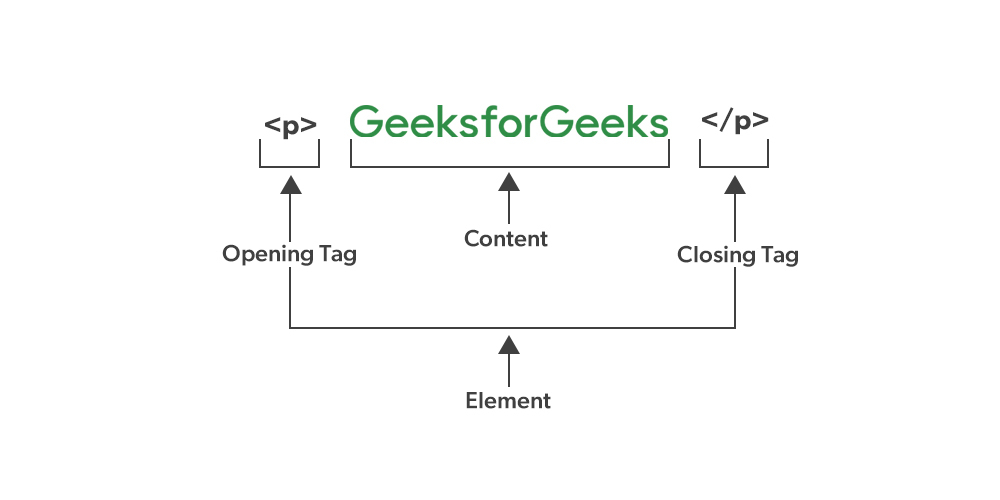
Most HTML tags come in pairs. The opening tag marks where the content starts, and the closing tag marks where it ends. The content sits between these two tags.
For example:
<p>This is a paragraph</p>
Here, <p> is the opening tag, </p> is the closing tag, and “This is a paragraph” is the content. The browser reads this and understands that the text should be displayed as a paragraph.
What an HTML Element Means
An HTML element includes everything together: the opening tag, the content, and the closing tag. In other words, the tag alone is not the element—the full structure is.
So when we say “HTML element,” we are referring to the complete unit that the browser works with. This distinction is important because beginners often confuse tags with elements. A tag is just a part, while an element is the whole thing.
Self-Closing (Void) Elements
Some HTML elements do not wrap content. These are called self-closing or void elements. They exist on their own and do not need a closing tag.
For example:
<img src="image.jpg">
An image does not contain text inside it, so there is no closing </img> tag. Other examples include line breaks and input fields. These elements simply tell the browser to place something at that location.
Block-Level vs Inline Elements
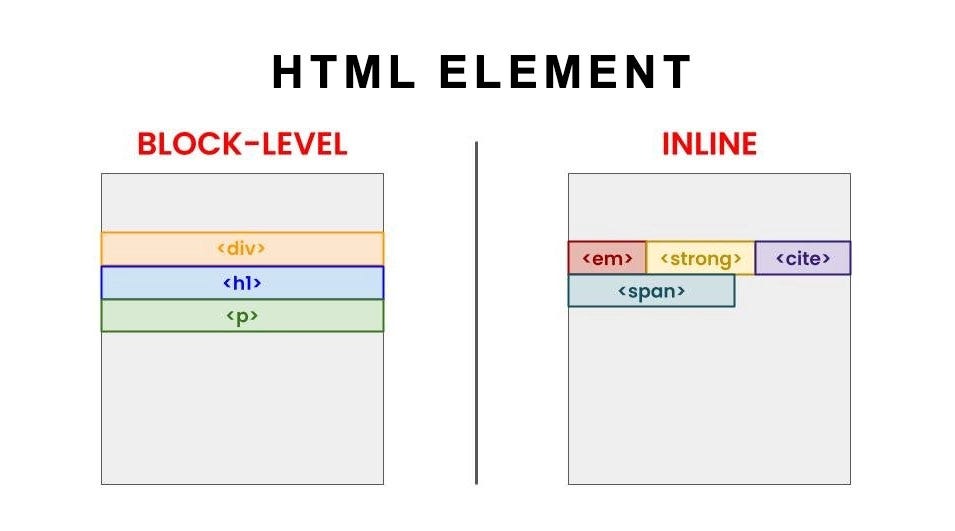
HTML elements behave differently on the page. Block-level elements start on a new line and usually take up the full width available. Paragraphs and headings are good examples. When you place them on a page, they naturally stack one below the other.
Inline elements, on the other hand, stay within the same line as surrounding text. They do not force a new line. Inline elements are often used to style or wrap small pieces of content without breaking the layout.
Understanding this difference helps you predict how elements will appear on the page.
Commonly Used HTML Tags
When starting out, you don’t need to know every HTML tag. A few basic ones are enough to build simple pages. Headings like <h1> are used for titles. The <p> tag is used for paragraphs. <div> is a general-purpose container used to group elements. <span> is used for small inline pieces of text.
These tags appear in almost every webpage and are a great place to start learning HTML.
Why It Helps to Inspect HTML in the Browser
One of the best ways to learn HTML is to inspect real websites. Browsers allow you to right-click on a page and view its HTML structure. This shows you how professional websites organize their content using tags and elements.
By inspecting HTML, you start recognizing patterns and understanding how your own code will behave.
Final Thoughts
HTML is simple by design. It focuses only on structure and meaning, not styling or behavior. By understanding tags, elements, and how content is organized, you build a strong foundation for learning CSS and JavaScript later. You don’t need to remember everything at once—HTML becomes clearer as you practice and build small projects.
Once you understand HTML, you stop seeing webpages as magic and start seeing them as structured documents.