How a Browser Works: A Beginner-Friendly Guide to Browser Internals

We all use browsers every day. Chrome, Firefox, Edge — we open them, type a URL, press Enter, and a website appears. It feels instant and simple. But behind that single action, a browser performs a long sequence of steps, involving networking, parsing, calculations, and rendering. Understanding this process helps you think like a web developer, not just a user.
So let’s start with a simple question.
What Happens After I Type a URL and Press Enter?
When you type a URL and press Enter, the browser does not immediately “show a website.” Instead, it begins a journey. First, it figures out where the website lives on the internet. Then it asks the server for the website’s files. After receiving them, it carefully reads and understands those files, decides how everything should look, and finally draws pixels on your screen.
A browser is not just a viewer. It is a coordinator, managing many systems that work together to turn raw text into a visual page.
What a Browser Actually Is (Beyond “It Opens Websites”)
At its core, a browser is a software application that fetches resources, understands them, and renders them visually. It acts as a bridge between the internet and your screen. It knows how to talk to servers, how to interpret HTML and CSS, how to run JavaScript, and how to display content efficiently.
Instead of thinking of a browser as a single tool, it’s better to think of it as a collection of components, each with a specific responsibility, working together like a team.
Main Parts of a Browser (High-Level View)
A browser is made up of several major parts. Some handle what you see and interact with, while others work silently in the background. There is a user interface that you click and type into. There is a networking layer that talks to servers. There are engines that understand HTML and CSS. And there are systems that calculate layout and paint pixels on the screen.
You don’t need to memorize all parts at once. What matters is understanding the flow from input to display.

User Interface: What You Interact With
The user interface is the visible part of the browser. This includes the address bar where you type URLs, tabs that let you open multiple pages, navigation buttons like back and refresh, and menus. This layer is mostly about user experience. It does not decide how a webpage is built internally; it simply allows you to interact with the browser.
When you press Enter in the address bar, the real work begins behind the scenes.
Browser Engine vs Rendering Engine (Simple Distinction)
Inside the browser, there are engines that handle different responsibilities. The browser engine acts as a middleman between the user interface and the rendering engine. It takes your actions, such as entering a URL or clicking a link, and tells the rendering engine what to do.
The rendering engine is the part that actually understands web content. Its job is to read HTML and CSS and turn them into something you can see. Popular browsers use different rendering engines, but at a high level, they all follow the same basic steps.
Networking: How the Browser Fetches Files
Once the browser knows which website you want, it uses the network to fetch resources. It sends requests to servers asking for HTML, CSS, JavaScript, images, and fonts. These files may come from one server or many different servers.
The browser waits for responses and starts working as soon as data begins arriving. It does not always wait for everything to finish downloading before moving to the next step.
HTML Parsing and DOM Creation
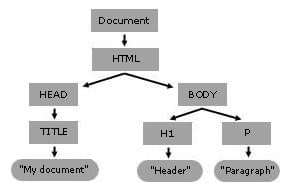
When the browser receives HTML, it does not display it line by line. Instead, it parses the HTML. Parsing means reading the text and understanding its structure.
The browser breaks the HTML into elements and organizes them into a tree-like structure called the DOM, or Document Object Model. You can imagine the DOM like a family tree, where each element has parents, children, and siblings. This tree structure allows the browser to understand how elements relate to each other.
CSS Parsing and CSSOM Creation
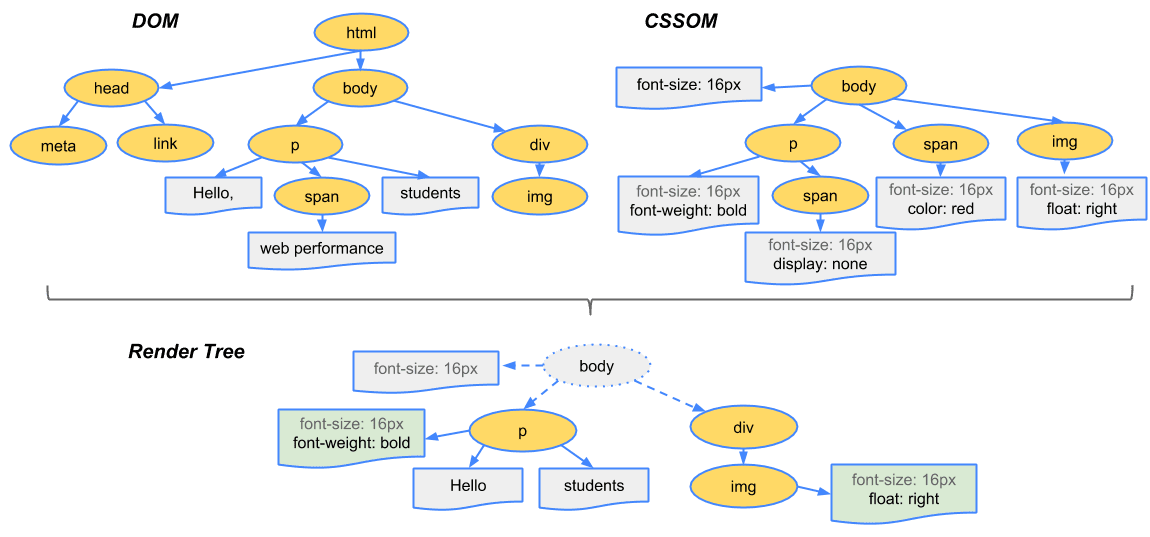
CSS is handled in a similar way. When the browser receives CSS, it parses it and builds another structure called the CSSOM, or CSS Object Model. This structure represents all the styles that apply to different elements.
The CSSOM helps the browser answer questions like which color a heading should be, how wide a container is, or which font should be used. Just like the DOM, the CSSOM is a structured representation, not raw text.

How DOM and CSSOM Come Together
Once the browser has both the DOM and the CSSOM, it combines them to understand how the page should look. This combined information is used to build a structure that contains both content and style.
At this point, the browser knows what elements exist and how they should be styled, but it still hasn’t drawn anything on the screen.
Layout (Reflow), Painting, and Display
Next comes layout, also called reflow. During this step, the browser calculates the exact position and size of each element on the page. It decides where things go, how much space they take, and how they align with each other.
After layout, the browser moves to painting. Painting means filling pixels with colors, text, borders, and images. Finally, everything is composited and displayed on your screen. This entire process can repeat when the page changes, such as when you resize the window or update content dynamically.
A Very Simple Idea of Parsing (Using a Math Example)
Parsing might sound complex, but the idea is simple. Imagine the expression “3 × 4 + 5” Before solving it, you first understand the structure: multiplication happens before addition. Parsing is the step where meaning is extracted from symbols.
In the browser, parsing HTML and CSS is similar. The browser first understands what the code means before deciding how to display it.

Why Beginners Don’t Need to Remember Everything at Once
You don’t need to memorize every term or step. What matters is understanding the overall flow. A browser fetches files, understands their structure, applies styles, calculates layout, and paints pixels. The details become clearer over time as you build projects and debug issues.
Every developer learns this gradually. Confusion at the beginning is normal.
Final Thoughts
A browser is far more than a tool to open websites. It is a complex system that fetches data, parses languages, builds internal models, and renders visuals — all in milliseconds. By understanding this flow at a high level, you gain insight into performance, layout bugs, rendering issues, and how your code actually reaches users.
Once you see the browser as a pipeline of steps instead of a black box, web development starts to make much more sense.