Getting Started with cURL

When you open a website or use an app, your device is always talking to a server. Understanding how this communication works is important for every programmer. cURL is one of the easiest tools to learn this communication without using a browser.
What is a Server and Why We Need to Talk to It
A server is a computer on the internet that responds to requests. It stores websites, provides data, and performs actions when asked.
We need to talk to servers because:
Websites are stored on servers
APIs live on servers
Apps need data from servers
Forms and logins are handled by servers
Every time you use the internet, a request is sent to a server and a response comes back.
What is cURL (In Very Simple Terms)
cURL is a command-line tool that allows you to send requests to servers directly from the terminal.
In simple words:
You type a command
cURL sends a message to a server
The server replies
cURL shows the reply in text form
You can think of cURL as a browser without a screen.

Why Programmers Need cURL
Programmers use cURL to understand and test how servers behave without relying on browsers or apps.
cURL is useful because:
It helps test if a server is working
It allows checking API responses quickly
It shows raw data without hiding details
It is available on almost all systems
It improves understanding of networking basics
Learning cURL builds confidence in backend and API-related work.
Making Your First Request Using cURL
The simplest cURL command is used to fetch a webpage.
curl https://example.com
What happens here:
cURL sends a request to the server
The server sends back HTML
The HTML is displayed in the terminal
This proves that cURL can fetch data just like a browser.
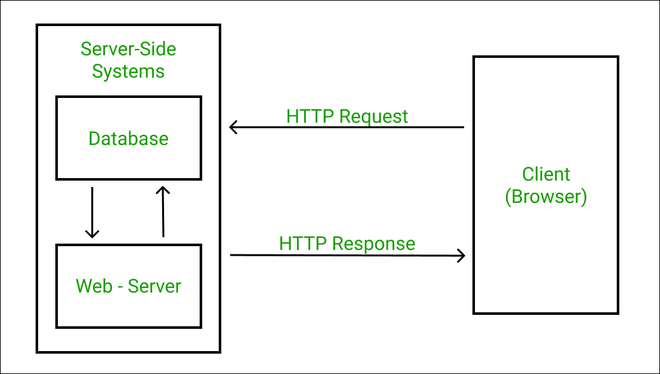
Understanding Request and Response
All communication with a server follows a request–response model.
Request means:
Where you are sending the message
What data or resource you want
Response means:
Whether the request was successful
What data was returned
cURL allows you to see this exchange clearly.
Understanding the Server Response
A server response usually contains two important things:
Status – tells whether the request succeeded or failed
200 means success
404 means not found
500 means server error
Data – the content returned by the server
HTML page
JSON data
Plain text
At the beginner level, focus on understanding that status tells what happened, and data is what you receive.
Using cURL to Talk to APIs
APIs are servers that send data instead of web pages.
Example:
curl https://api.github.com
When you run this:
cURL sends a request to GitHub’s API
The server returns JSON data
cURL prints the data in the terminal
This is how applications communicate with each other.
GET and POST (Only the Basics)
You don’t need all HTTP methods at once. Start with just two.
GET
Used to get data from a server
Common for fetching pages or API data
POST
Used to send data to a server
Common for submitting forms or creating data
At this stage, remember:
GET = receive data
POST = send data
Common Mistakes Beginners Make with cURL
Beginners often feel overwhelmed while learning cURL. Some common mistakes include:
Trying too many flags at once
Expecting clean UI output like browsers
Memorizing commands instead of understanding concepts
Thinking raw data means something is broken
Giving up too early
Start small and focus on understanding the basics.
Why Learning cURL Is Important
Learning cURL helps programmers:
Understand how the internet works
Debug API and backend issues
Gain confidence with networking concepts
Work better with frontend and backend systems
Once you understand cURL, APIs and servers stop feeling mysterious.
Final Thoughts
cURL is a simple yet powerful tool that teaches you how servers and clients communicate. You don’t need to master everything at once. Start with simple requests, understand responses, and slowly build confidence. With cURL, you are learning how the internet truly works behind the scenes.